

7.9 KiB
Week 1.4
Assinment 4.1
The teacher has built a simple preemptive OS that is still missing some important features. In these assignments you’ll implement some extra features and gain a bigger understanding in how an OS operates. Next week we’ll start using a fully developed RTOS with all necessary features for a production environment.
A) Download the project VersdOS.zip.
B) Import this project, Open and Finish. Build and debug the project. The LEDs should blink.
C) Browse through the code and especially make sure you understand the scheduling process and the context switch.
D) Measure the periods at which the LEDs toggle using a logic analyzer and explain why this is not 2× but 8× theblocking_delaytime.
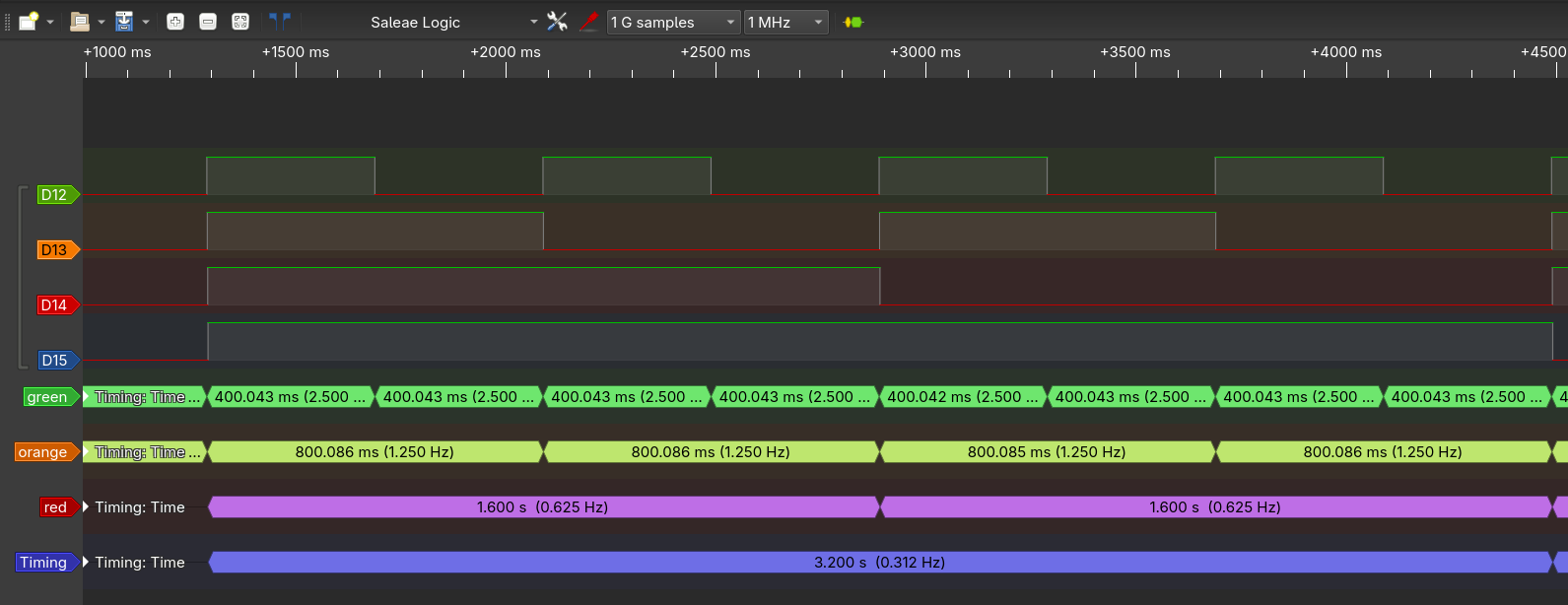
In the Code it the values for blocking delay are 100, 200, 400, 800 for green, orange, red, blue. The blocking_delay function wait for this number of SysTicks, witch is set to 1ms. I measure delays of 0.4s, 0.8s, 1.6s and 3.2s. This is indeed 4x slower of what I would expect on first glance. This delay is because this is a preemptive scheduler, the other tasks run in between. There are 4 task all with the same priority, so each task takes 4 time longer.
Assignment 4.2
A) implement a non-blocking delay so that a task can request the OS to be kept out of the scheduling loop for a certain number of system ticks. The scheduler should remain preemptive and perform round-robin on all the available(not delayed) tasks. Once the requested number of system ticks have passed, the scheduler should include the task in the selection process. You may use the
taskYield()function to let the OS know a task is ready to be switched out.
To allow for a non blocking delay the OS should keep track of the time the to wake it up on the correct time. I did this by adding the new task state SLEEPING_DELAY to the enum.
There already is an counter in the task struct. but no function that decrements this counter. So I added the following function the the OS.
void decrement_sleeping_delay()
{
	for (usize_t i=0; i < MAX_TASKS; i++)
	{
		if (taskList[i].state == SLEEPING_DELAY)
		{
			if (taskList[i].counter == 0)
			{
				taskList[i].state = READY;
			}
			else
			{
				taskList[i].counter--;
			}
		}
	}
}
This function is added to the SysTick_Handeler before the scheduler is run. So that if the counter is 0 the decrement_sleeping_delay makes the task ready again, and is directly available for to be scheduled. This makes a delay of 0, wait for the next SysTick.
The SysTick_Handeler now look like the following
void SysTick_Handler(void)
{
	SysTick_flag = true;
	//decrement counter for task in SLEEPING_DELAY
	decrement_sleeping_delay();
	//select the next task
	taskToExecute = schedule();
	//request context switch
	SCB->ICSR |= (1<<28);
}
Before stating to write the delay function for the tasks, in the schedule funciton the line that sets the current task to ready sould be removed (line 163 in VersdOS.c). If the state is chanced during execution of the task, this line reset is at the next try to reschedule this state back to READY so the state will never actually be changed.
As last the delay function itself.
void delay(uint32_t ticks)
{
	currentTask->state = SLEEPING_DELAY;
	currentTask->counter = ticks;
	taskYield();
}
Now all the line extern void delay(uint32_t ticks); can be added to the begin the main.c and all the blocking_delay calls can be replace by delay.
Result
The compete code can be found at /report-2/week_1.4/assignment_4.2/.
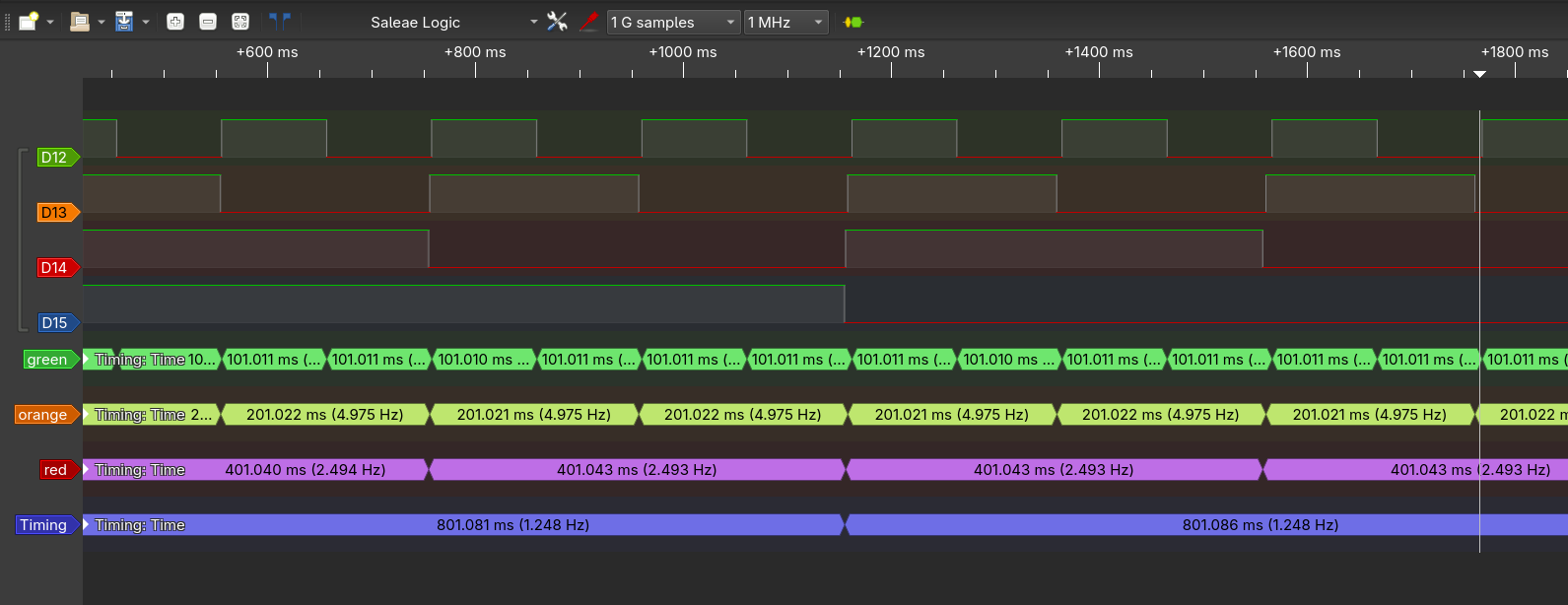
This implementation works, only the delays are a bit off. To make it a nice counter again all delays should be decremented by one (figure \ref{42_logic} shows the output with the original timings, not the decremented ones). This is because with my implementation there is a delay added until the next SysTick after delay is called. blocking_delay(0) instantly returns without waiting for an SysTick (code below). It check if the counter is zero before waiting. For my delay(0), it does wait for a SysTick and checks the counter after. To me the added delay make more sens. My delay is between number of the arguments in SysTick up to one extra, depending how long until the first SysTick is.
void blocking_delay(unsigned int ticks)
{
	while (ticks != 0) {
		extern bool SysTick_flag;
		while (SysTick_flag == false); // busy wait
		SysTick_flag = false;
		ticks--;
	}
}
Assignment 4.3
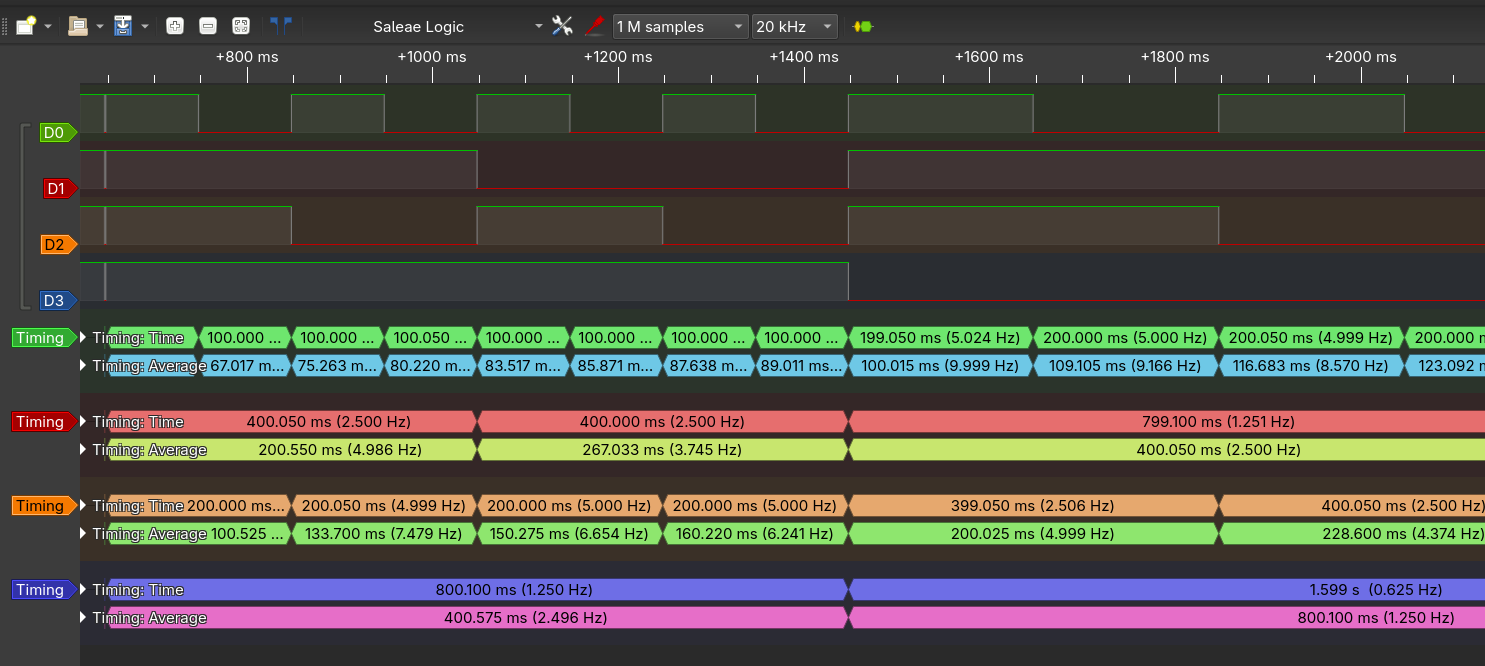
A) Try changing the SysTick period to 2 ms within a task. A task can change the SysTick period to any value it wants, but you can imagine this isn’t desired behavior.
I changed the toggleBlue task to the following
void toggleBlue(void)
{
    while(1)
    {
    	GPIOD->ODR ^= 1 << BLUE;
    	delay(800-1);
    	SysTick->LOAD = 2 * CLOCK_FREQ_IN_KHz - 1;
    }
}
B) Implement unprivileged mode for the tasks. When succeeded the previous test should fail and be caught in an infinite ISR fault-handler.
With Ctrl+F in some books I only found the nPRIV bit in the control register (PM0214 - STM32 Cortex® -M4 MCUs and MPUs programming manual) as information how to switch privilege. I assume the interrupts used by the OS automatically go to privileged mode, and I only need to go to unprivileged mode before starting a task.
The control register is a special register to it need to be set and read with special instructions. With MSR (page 187 of PM0214) a special register, like control, can be set and MRS (page 186 of PM0214) it can be read. With this information I added the following function to VersdOS_ll.s to set the nPRIV bit.
        .global toUnprivileged

toUnprivileged:
		mrs     R0, CONTROL    // copy control register to R0
		ORR     R0, R0, #1     // clear bit 0 (nPRIV)
		msr     CONTROL, R0    // copy R0 to control register
		bx		lr
And called this function in the PendSV_Handeler
void toUnprivileged(void);

__attribute__((naked)) // No function entry and exit code
void PendSV_Handler(void)
{
	//Push {R4-R11} context to PSP
	pushRegistersToCurrentPSP();
	//Save the new stack pointer after the push
	currentTask->stack = readPSP();

	currentTask = taskToExecute;

	//Load the new stack pointer from (new) currentTask
	writePSP(currentTask->stack);

	//Pop {R4-R11} context from PSP
	popRegistersFromCurrentPSP();

	toUnprivileged(); // <--- this line was added

	returnToPSP();
}
The resulting code can be found at /report-2/week_1.4/assignment_4.3/
And tested it.
One step after the 'malicious' code, it jumps to this infinite loop.
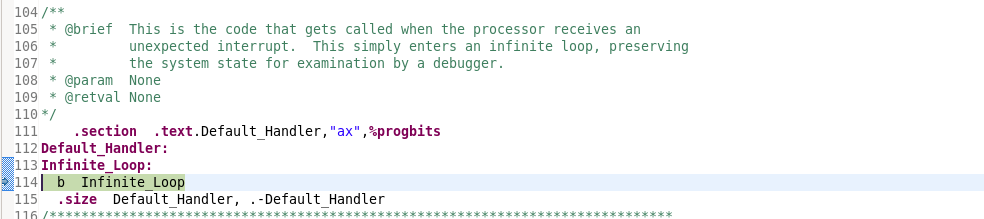
and when the 'malicious' code is removed, it functions as normal.
Assignment 4.4
Tasks are no longer able to access the SysTick peripheral. It is time to implement a system call using the SVC interrupt mechanism. The
taskYield()function would also classify as a system call. Write a system call function that will allow a task to change the SysTick period to a value between 1 and 10 ms . The system call should utilize the SVC mechanism by passing a different number than thetaskYield()call. Make sure both calls keep working! Within the SVC interrupt service routine you will have to find the used SVC instruction using the PC value and look at the LSB to determine the system call number. You can also utilize the tasks’ stack to find the passed SysTick period parameter. When this parameter is invalid the system call should simply return.